
Architecture
How Monky is built on the inside: the components, how they talk to each other, and why the decisions were made that way.
This page describes what exists in the code today. If you are looking for the project's original specification — with MVP, phases and future ideas — it lives in docs/especificacao-tecnica.md.
The core idea: two separate planes
Everything in Monky starts from one split: what the server controls and what travels directly between people.


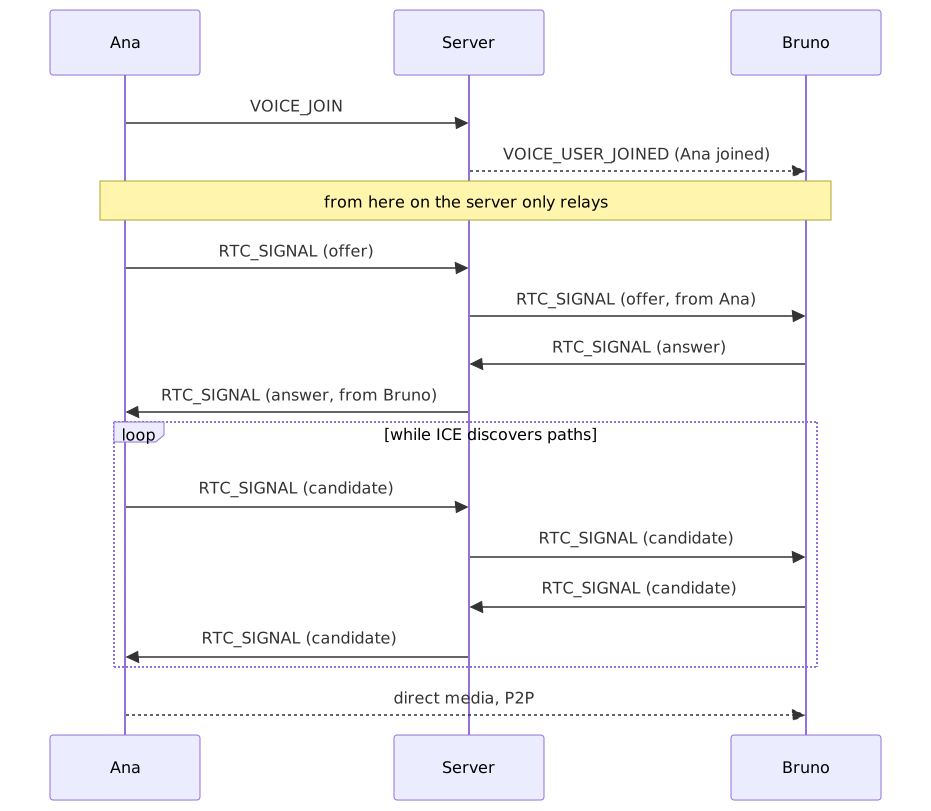
The server handles login, channels, chat, roles and signaling. In the default mode, it introduces participants to each other and then steps aside: voice, video and screen travel P2P over WebRTC, without passing through it.
That has two consequences which explain nearly everything else in the project:
- The server's bandwidth barely matters. It carries no media, so a modest VPS is enough for the group. The bandwidth cost sits with the participants.
- The conversation is not readable by the server. Even the person hosting cannot listen in — WebRTC is encrypted end to end between the peers.
Both consequences describe the default mode
Whoever hosts can switch the media plane to SFU mode, and then neither statement above holds: the server starts carrying all of the channel's media and gains access to its contents. SRTP terminates at mediasoup, which decrypts each packet and encrypts it again for every recipient — that is how any SFU works, and it is the price of not sending the same video N times. There is still no third party involved, since the server is yours, but "not even the host can listen in" is a property of P2P Mesh, not of Monky.
The components
The repository is a monorepo with npm workspaces:
| Workspace | What it is |
|---|---|
apps/client | The Electron app — the interface, and also the host when you host from the app itself |
apps/server | The server: WebSocket, SQLite and the Monky CLI |
packages/shared | The contract between the two: protocol types, validators, limits and quality profiles |
packages/shared is what stops client and server from drifting apart: both import the same types and the same validators.
The client
Three processes
Electron splits the app into three contexts, and Monky respects that split:


The renderer runs with contextIsolation: true and nodeIntegration: false: the UI has no access to Node. Anything that needs the operating system — picking a screen to share, reading the native audio module, touching the tray — goes through the window.api bridge exposed by the preload.
The UI uses no framework
Possibly the project's most unusual decision: the renderer is plain TypeScript and DOM. There is no React, Vue or Svelte. Views build their own HTML with template strings and re-render themselves.
State lives in singleton stores that emit events on a bus (appEvents), and views subscribe to whatever concerns them:


The services
Every large client responsibility lives in its own class, under src/renderer/core/:
| Service | Responsibility |
|---|---|
NetworkClient | WebSocket, authentication, heartbeat and reconnection |
WebRtcManager | The P2P connections: mesh, tracks, renegotiation |
AudioProcessor | Microphone, noise suppression, speech detection |
VideoService | Shared camera capture, local effects and screen capture |
ScreenAudioService | Bridges the native screen-audio module into WebRTC |
ParticipantManager | Who is online, in which channel and in what state |
SoundboardService | Soundboard clips and shortcuts |
KeybindService | Global shortcuts |
AttachmentUploader | Chat attachment uploads |
UpdateService | Update check and banner |
What is stored on your machine
The client uses localStorage for simple preferences, IndexedDB for camera effects and the background image, and native storage for identity. These stores have different purposes and guarantees.


| Key | Contents |
|---|---|
monky_settings | Preferences: quality, devices, volumes, shortcuts, soundboard |
monky_nickname / monky_avatar | Your visual identity |
monky_saved_servers | Servers you saved to reconnect to |
monky_created_servers | Servers you created on this machine |
monky_favorites | Local sound favorites by full path and server favorites by address/port |
monky_device_id | Identifies this device (lets the same person use two machines) |
monky_language | Interface language |
In the monky-camera-effects IndexedDB database, preferences and one normalized image share a transactional record. Persistence failure does not change the in-memory preference; corrupt data is not interpreted as consent to transmit the camera without an effect.
Segmentation uses MediaPipe/Selfie Segmenter with bundled model and WASM assets, without a CDN or frames sent to an API. Segmentation, compositing and chroma key run in an OffscreenCanvas worker, with at most one frame in flight. The segmenter is created lazily once per worker and reused across blur, color, image and chroma transitions; it stays idle during chroma. Turning effects off or ending capture releases the worker and model. Resolution and frame cadence follow the selected profile. The optional limiter, off by default, caps both at 1280 × 720 and 30 FPS without upscaling a smaller capture or duplicating frames to compensate for capture or processing limitations. CameraPublication coordinates replacements and failures with P2P/SFU publishers; capture belongs to VideoService, not to the preview or producer.
The private key is deliberately absent from that list. It is what proves who you are (see Authentication) and it never reaches the renderer: it lives in identity.json, inside the userData folder, encrypted with Electron's safeStorage — the operating system's own vault. Where the system offers no encryption the file is written in the clear, and the record itself says which of the two happened.
The server
The three ways to run it
The same server code goes up in three shapes, and the difference is not technical — it is about who looks after it:


Hosting from the app is the two-click path, and that is why the client imports @monky/server directly: no separate process, no admin port. The price is that the server lives only as long as the app does.
The CLI exists for the opposite case — a server that should not depend on somebody keeping a window open. It manages several servers on the same machine, each with its own data folder and its own PM2 process.
Layers
There is no dependency injection container: wiring is explicit, done by hand in MonkyServer.create(). You can read the file and see exactly what depends on what.


Beyond the WebSocket, the server exposes a few HTTP routes: /health, /preview and /invite-info (public information for the invite screen), /avatars/* and the /attachments upload/download.
The default port is 3000.
The protocol
Every message has the same shape:
{
  type: MessageType,     // 'CHAT_SEND', 'VOICE_JOIN', 'RTC_SIGNAL'…
  requestId?: string,    // echoed in the response, for correlation
  payload: T
}
The requestId is what lets the client know which response belongs to which request — the WebSocket is asynchronous and responses do not necessarily arrive in the order they were asked for.
Payload validation uses zod, with the schemas in packages/shared — the very same ones the client uses to validate before sending.
The protocol version is exact, not compatible
PROTOCOL_VERSION, defined in packages/shared/src/constants.ts, must be identical on both sides. There is no negotiation and no compatibility mode: if the client sends a version different from the server's, authentication is refused.
That is why bumping the protocol is always a breaking change and forces a major release — there is even a CI check that fails the PR when this is not respected.
Authentication: the server never sees a password of yours
Login is challenge–response with public-key cryptography. You have no account and no sign-up: your identity is your key pair.
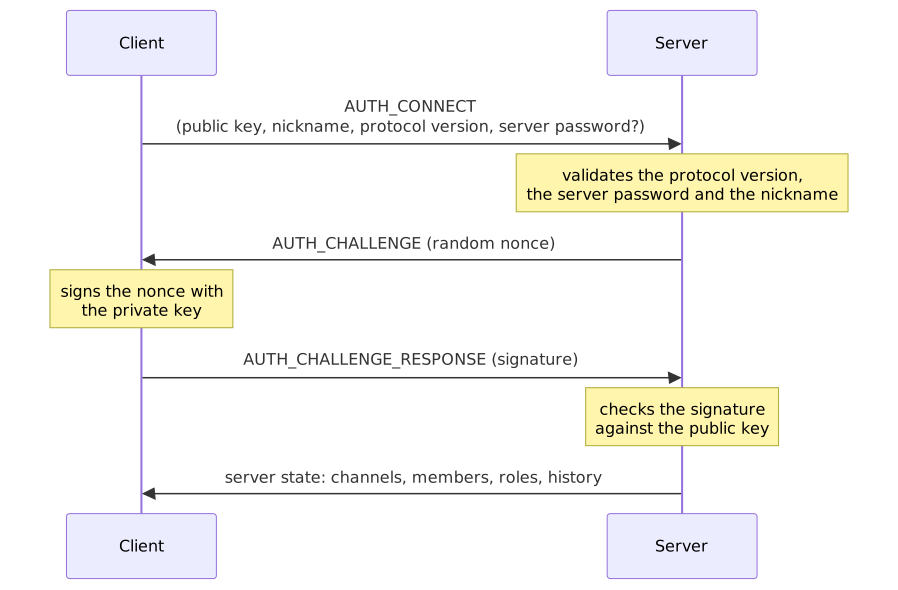
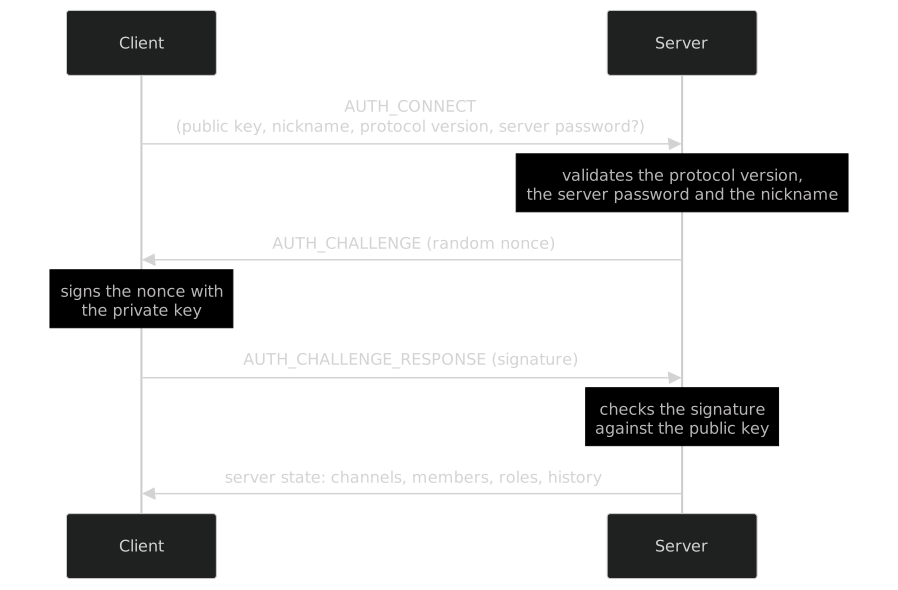
The clientId is derived from the public key itself, so it cannot be forged: without the private key you cannot sign the challenge.
The server password, when there is one, protects entry — it is checked before the challenge is issued.
Sessions: the same person on several devices
A session is identified by userId:deviceId, not just by the user. That is what lets you be on the desktop and the laptop at once while appearing as a single person.
- Reconnecting from the same device replaces the old connection (avoiding ghosts after a network drop).
- Connecting from another device creates a new session, up to a cap of 3 simultaneous sessions per identity.
The cap exists so a single identity cannot exhaust the server's resources (connections, audio, bandwidth) by opening endless devices. It is independent from maxUsers, which counts registrations — several sessions of the same person still take a single seat.
Database
SQLite, in a server.db file inside the server's data directory. Migrations are numbered .sql files, applied at startup and recorded in a schema_migrations table — the server only runs what it has not run yet.
| Table | Holds |
|---|---|
server_meta | Server configuration: name, password, owner, limits, icon |
users | Members, each with their public key |
channels | Voice and text channels |
messages | Chat history |
mentions | Mentions, for highlighting and notifying |
message_attachments | Message attachments |
roles / user_roles | Roles and who holds each one |
schema_migrations | Bookkeeping of applied migrations |
Roles and permissions
Permissions are bits combined into a mask. Two roles are special:
- Admin — gets every permission and cannot be deleted.
- Member — the default role for anyone who joins.
The check is centralised in PermissionService.checkPermission(). The server owner is a case apart: they get admin permissions regardless of which roles they hold.
Abuse protection
| Protection | How |
|---|---|
| Message flood | Sliding window: 10 messages every 5 s |
| Message size | 2000 characters |
| Avatar | 5 MB, and the file must carry a PNG, JPEG or WebP signature |
| Attachments | Per-file limit and a total server budget, both configurable |
| Soundboard | Audio refused above ~4 MB |
| Path traversal | File names go through basename and the final path is checked against the allowed folder |
Note the detail on avatars: validation looks at the file's magic bytes, not its extension. Renaming an executable to .png does not fool the check.
The media plane
Monky supports two voice and media topologies: default P2P Mesh and SFU (Selective Forwarding Unit) powered by mediasoup.
Topology 1: Full Mesh (Default)
Each participant opens a direct connection to every other one.


With N participants, each person keeps N−1 connections and the channel has N(N−1)/2 in total. Whoever shares a screen sends the same video N−1 times, once per peer.
When to use P2P Mesh
Excellent for small friend groups and lightweight/free VPS instances with low CPU or bandwidth, since the server does not relay audio or video packets.
Topology 2: SFU (Selective Forwarding Unit)
In SFU mode, each client opens only 2 WebRTC Transports with the host server:
sendTransport: Transmits local audio and video tracks (microphone, camera, screen and system audio).recvTransport: Receives forwarded tracks from all other participants routed through themediasoupworker.
The broadcaster encodes and sends 1080p60 screen streams only once, drastically reducing upstream bandwidth and local CPU load.
Resilience & Automatic Reconnection
If the SFU process encounters errors or unexpected downtime, clients show a notice and rebuild the SFU session automatically, backing off between attempts until the server is back.
There is no drop to P2P: a mesh where only the side that noticed the failure switches protocol never forms, because the other side keeps answering as an SFU client and discards the incoming offer. That would leave a silent call behind a reassuring notice — so the client reconnects instead of degrading.
When an administrator explicitly switches from SFU to P2P, participants are notified and the client tears down its previous transport before automatically returning to its own channel. Re-entry uses a temporary, one-use authorization tied to that session and channel, respecting current permissions and limits. Leaving voluntarily, being removed, or starting another call cancels the automatic return.
Signaling
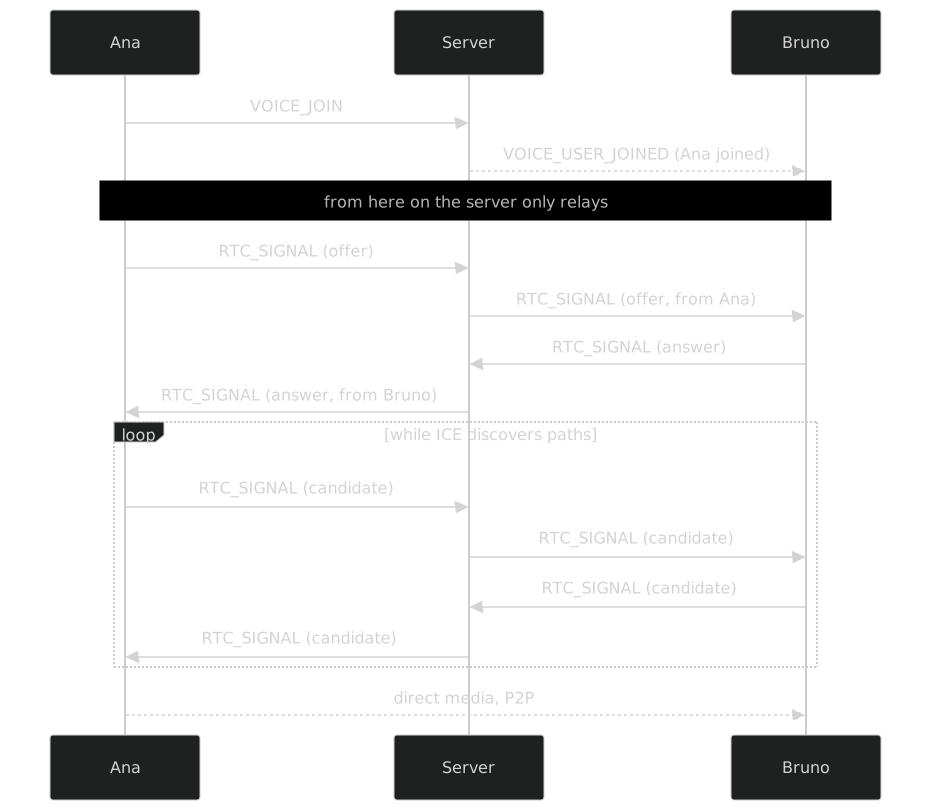
The server only delivers envelopes. It rewrites the sender (so nobody can forge an identity) and refuses delivery if the two peers are not in the same voice channel.
Getting through NAT
Almost nobody has a direct public IP, so peers need to work out how to reach each other. Monky uses public STUN servers (Google and Cloudflare) so each side can discover its own external address.
TURN is optional, and off by default
STUN only discovers the path; it does not relay anything. When the network is too restrictive — symmetric NAT, corporate firewall, some carrier CGNATs — there is no direct path and the media connection fails.
A TURN server solves it by relaying the media. But TURN carries video, and costs bandwidth proportional to usage — which reintroduces exactly the cost the P2P architecture avoids. That is why Monky's relay is optional and ships off: whoever hosts decides whether to pay that bandwidth.
When enabled, the server runs a coturn alongside it and hands out the credentials at login. ICE still prefers the direct route and only uses the relay for the pairs that genuinely cannot connect. Details in Media relay (TURN).
When a connection drops or stalls, WebRtcManager first tries an ICE restart (renegotiating the path without tearing down the call) and, failing that, rebuilds the connection to that peer from scratch.
Audio


Capture already requests built-in WebRTC echo cancellation and automatic gain. The diagram shows the default RNNoise engine; Speex and GTCRN occupy the same point in the graph. All three run in AudioWorklet, with WASM bundled by the existing @sapphi-red/web-noise-suppressor dependency. Selecting one disables built-in suppression to avoid stacking processors. WebRTC (built-in) suppression and no suppression are also available.
AudioProcessor prepares the next engine before replacing the internal connection, preserving the destination track sent through P2P or SFU. Local preview shares the processed call stream when possible; when it needs its own capture, it applies the same engine without connecting to speakers or WebRTC.
Outputs resolve general and per-category preferences. Voice and screen audio have separate AudioContexts across the entire 0–200% volume range. Chromium shares a native renderer between WebRTC tracks: audio elements stay active at zero volume for decoding, and only the category graphs produce sound. The shared native output follows voice to align the echo-cancellation reference; it is never redirected to the chosen screen output. Native chat players, including the expanded viewer, apply the media output before starting playback.
Mute and deafen disable the track (enabled = false) instead of removing it. That way there is no need to renegotiate the connection on every click of the mute button.
Video and screen sharing
The camera follows the resolution and FPS of the selected quality profile.
Screen sharing is a track separate from the camera — you can transmit both at once. When you start sharing, the connection is renegotiated and Monky sends a screen-video-meta alongside it, so the other side knows that track is a screen and not a face.
You can share up to 2 screens at once. Each is identified by the id of its own MediaStream, and that id is what ties together the track, the sender and the tile on screen.
Monky also tags the track with a content hint: motion favours smoothness (good for games and video), detail favours sharpness (good for code and text).
Screen audio: the native module
The browser does not hand over system sound together with the screen image. That is why Monky has a native C++ module:
| Platform | How |
|---|---|
| Windows | WASAPI process loopback — captures system sound or a specific app's, excluding Monky itself so it does not echo |
| macOS | ScreenCaptureKit (macOS 13+), with a window filter so audio from apps you are not sharing does not leak |
| Others | Not supported — the app keeps working, just without screen audio |
If the module fails to load, nothing breaks: sharing keeps working without sound and the app says so.
Quality and bandwidth
Profiles control resolution, FPS and the bitrate ceiling, applied through RTCRtpSender.setParameters():
| Profile | Audio | Camera | Screen |
|---|---|---|---|
| Economic | 24 kbps | 640×360 @ 24fps · 250 kbps | 854×480 @ 15fps · 900 kbps |
| Normal | 32 kbps | 854×480 @ 30fps · 450 kbps | 1280×720 @ 30fps · 2000 kbps |
| High Quality | 48 kbps | 1280×720 @ 30fps · 600 kbps | 1920×1080 @ 30fps · 3500 kbps |
| Gaming Mode | 28 kbps | 640×360 @ 20fps · 300 kbps | 1920×1080 @ 60fps · 6000 kbps |
Gaming Mode is the most telling one: it reduces the camera to spend everything on the screen at 60fps. And only there does the degradation preference become maintain-framerate — under tight bandwidth Monky sacrifices resolution to hold 60fps, because in a game smoothness matters more than sharpness. In the other profiles it is the opposite.
Remember these numbers are per peer. Sharing a screen in High Quality to 4 people asks for roughly 14 Mbps of uplink.
Telemetry
During a transmission Monky reads WebRTC statistics (RTCPeerConnection.getStats()) every 1.5 s and shows the real FPS, resolution and bitrate — on the sending side also codec and keyframes; on the receiving side packet loss and jitter.
Reconnection
When the WebSocket drops, the client tries to come back on its own with growing waits (1s, 2s, 3s, 5s — the last one repeats). The server keeps the session alive for 20 seconds before announcing the departure, so a quick Wi-Fi hiccup does not throw anyone off the list.
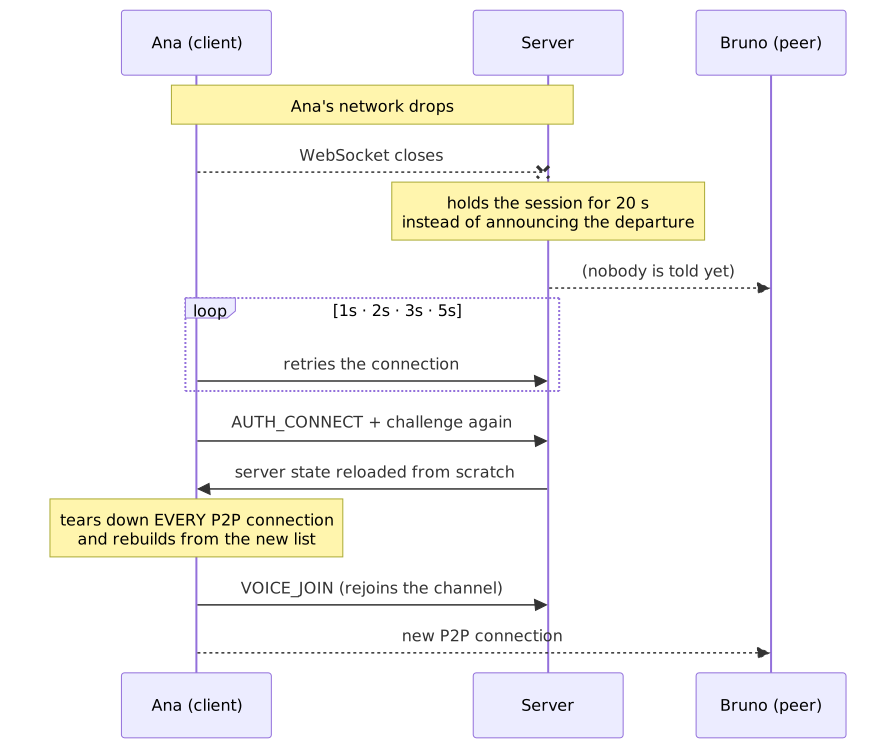
Notice the least intuitive step: on the way back the client tears down every P2P connection and starts over, including the ones that looked alive. It sounds drastic, but it is the most reliable path — while the WebSocket was away other people may have joined, left or switched channels, and there is no way to know which of the old peers still hold. Rebuilding from the new state is cheaper than finding out, peer by peer, who is left.
If the 20 seconds run out before the client is back, the session is closed and the departure is announced normally — the reconnection becomes a fresh join.
Where everything lives
apps/
  client/
    native/screen-audio/     C++ screen-audio module (Windows/macOS)
    src/main/                main process: window, tray, updater, IPC
    src/preload/             the window.api bridge
    src/renderer/
      core/                  services: network, WebRTC, audio, video
      stores/                state + events
      views/                 the screens
      i18n/                  PT/EN translations
  server/
    src/application/         business rules (services)
    src/infrastructure/      WebSocket, database, security, logs
    src/cli/                 the Monky CLI
packages/
  shared/                    protocol, validators, limits, profiles
Known limits
Things that follow directly from the architecture, and are not bugs:
- Mesh does not scale. Great for a handful of friends, bad for dozens. Larger groups switch to SFU mode, paying with host bandwidth and CPU for what each participant's connection saves.
- TURN is off by default. Very restrictive networks can prevent the media connection even when the server is reachable. An optional relay exists, but it costs the host bandwidth and only runs on Linux.
- The protocol requires an exact match. Client and server need the same
PROTOCOL_VERSION; updating only one side breaks the connection. - Screen audio only on Windows and macOS, because it depends on each system's native API.
Learn more
- Monky CLI — command-line administration
- Host on a VPS — putting a server online
- Features — what the app does, from a user's point of view
- CONTRIBUTING.en.md — how to contribute code