
Commands and autocomplete
Define how people discover your bot, which values it receives and when searches happen. These snippets extend the bot instance from Your first bot and require commands.
Reference: CommandDefinition and contexts, CommandOption and SelectionChoice.
Anatomy of a command
bot.command({
  name: 'name',               // Slash command name (without the /)
  description: 'Description',  // Shown in the command dropup
  options: [                   // Parameters (optional)
    {
      name: 'param',
      description: 'Parameter description',
      type: 'string',         // Parameter type
      required: true,          // Required?
    },
  ],
  handler: (ctx) => {
    // ctx.channelId  — channel where it was invoked
    // ctx.invokerId  — user ID
    // ctx.invokerNickname — nickname
    // ctx.invokerSessionId — connection/device that started the command
    // ctx.invokerVoiceChannelId — initial voice room, not live state
    // ctx.getVoiceChannel() — query the original connection's current room from the server
    // ctx.serverId   — server ID (useful in multi-server mode)
    // ctx.args       — arguments { name: string | number | boolean }
    // ctx.locale     — preferred language for this bot ('pt-BR' or 'en')
    // ctx.reply()    — reply only to the caller, within the chat
    // ctx.publish()  — explicitly publish a result in the channel
    // ctx.prompt()   — await a private form; may be called in multiple steps
    // ctx.choose()   — await a private choice through buttons or a dropdown
    // ctx.createScreen() — create a shared screen independent of the handler
    // ctx.downloadSound() — await an authorized local soundboard download
    // ctx.signal     — aborts on cancellation, disconnect, timeout or completion
  },
});
Command language and individual preferences
Each person can use the Bot settings > My preferences > Bot language dropdown and confirm with Save, even for bots without their own settings form. Follow Monky uses the app's language; an explicit choice applies only to that bot, server/address, and identity in the local profile. Restoring defaults follows Monky again. The effective language arrives in ctx.locale, including autocomplete and audio previews. Existing interactions retain their captured language for forms and choices. Bot-authored message variants follow each reader's app language, including in history. A response's command attribution follows each reader's language using the available metadata; without that metadata, it falls back to the canonical name.
Declare localizations for private names, aliases, command discovery, and input labels:
bot.command({
  name: 'play',
  description: 'Choose playback order',
  options: [{
    name: 'mode', label: 'Mode', description: 'Playback order', type: 'string',
    choices: [{ label: 'Shuffle', value: 'shuffle' }],
  }],
  localizations: {
    'pt-BR': {
      name: 'tocar',
      aliases: ['musica'],
      description: 'Escolha a ordem de reprodução',
      options: {
        mode: {
          label: 'Modo', description: 'Ordem de reprodução', placeholder: 'Escolha',
          choices: { shuffle: { label: 'Aleatório' } },
        },
      },
    },
  },
  handler: (ctx) => { ctx.reply(ctx.locale === 'en' ? 'Ready.' : 'Pronto.'); },
});
The top-level name remains canonical: a Portuguese user sees /tocar and can type /tocar, /musica, or /play, but the server and ctx.commandName receive play. This preference is only for that person, never a global rename. Argument names, ctx.args.mode, and choices[].value are not translated. Descriptions, label, placeholder, and choice labels/descriptions remain localizable; undeclared fields or choices are rejected. Missing text falls back to the original declaration.
Local names and aliases are lowercase ASCII slugs of 1–32 characters: they start with a letter or digit and allow letters, digits, _, and -. Each locale allows up to eight unique aliases. Bot registration rejects collisions between commands, including aliases that shadow another command's canonical name. Cross-bot collisions still require selecting the bot, rather than executing the first match. Only the effective locale's aliases and canonical names are accepted. Changing language while composing refreshes names and labels without losing the selected bot, canonical command, values, or caret.
The SDK exports BotLocale, normalizeBotLocale, resolveBotLocale, and localizeCommand, plus getCommandPresentation and the CommandPresentation type. normalizeBotLocale('en-US') returns en; use pt-BR and en as localizations keys. resolveBotLocale can receive the bot's supported languages and its default. localizeCommand produces display metadata without mutating the original declaration or identifiers. getCommandPresentation(definition, ctx.locale) returns { canonicalName, displayName, inputNames }. Use displayName in private help; never send it as the protocol's commandName. For example, using the same commandDefinitions array registered with bot.command():
import { getCommandPresentation, localizeCommand } from '@monky/bot-sdk';

bot.command({
  name: 'help',
  description: 'Help',
  localizations: { 'pt-BR': { name: 'ajuda' } },
  handler: (ctx) => ctx.reply(commandDefinitions.map(command =>
    `/${getCommandPresentation(command, ctx.locale).displayName} — ${
      localizeCommand(command, ctx.locale).description
    }`
  ).join('\n')),
});
Forms and choices still use ctx.locale, not ctx.settings.user.locale. ctx.reply() keeps help private; ctx.publish() makes it visible to the entire channel, even when each reader sees a different language.
Messages in the reader's language
ctx.reply(), ctx.replyEphemeral(), ctx.publish(), bot.sendMessage() and bot.finalizeSelector() accept a plain string or a BotLocalizedMessage:
ctx.publish({
  content: 'Track added to the queue.',
  localizations: {
    'pt-BR': 'Música adicionada à fila.',
    en: 'Track added to the queue.',
  },
});
The bot authors the variants; there is no automatic translation. Each reader selects a variant through their app language, not the command caller's language or the preference used for the bot's forms. content is required and serves as the fallback when a variant is unavailable. Each text follows the server limit (16,000 characters by default; 0 disables the character limit); supported keys are pt-BR and en.
Variants remain in history and reply references; copying uses the displayed text. Changing language updates the presentation without modifying the message. Deleting also removes its variants. Bots sending only strings still work, but those messages do not acquire retroactive translations.
Roll dice/coins once and render variants of the same result. Preserve track titles, questions, options and human-authored free text. The contract requires client, server and bot SDK versions compatible with protocol 21.
Guided parameters in chat
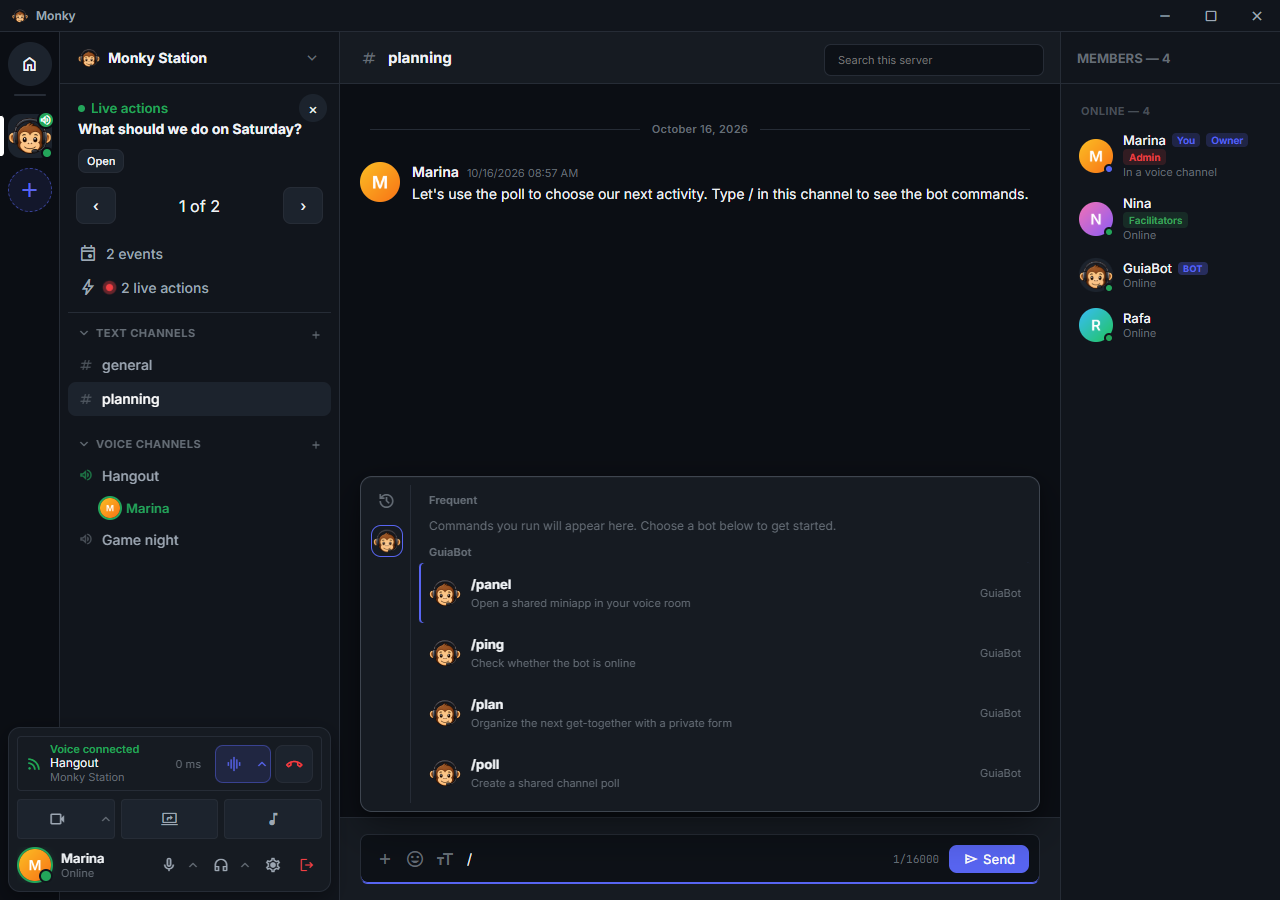
Typing / opens a menu with frequently used commands and sections grouped by bot. Each item identifies the command, its description, and its bot. While browsing, required parameter chips and the optional parameter count help choose a command. Pressing Space selects the highlighted command and opens its composer without executing it. Spaces in ordinary messages or parameter fields remain text.
Selecting a command with parameters identifies which bot and command are selected in a compact composer with named fields, descriptions, and placeholders. Optional parameters can be added when needed. Submission uses the names declared in options; there is no need to join values with commas. Commands without parameters that do not request local downloads, such as /ping and /help, start their interaction immediately when selected with a click, Enter or Tab; selecting with Space waits for an explicit submission.
Usage frequency stays local and is scoped by server and identity. Only counts and recency are stored, never the values entered in parameters.
| Type | Control | Value in ctx.args |
|---|---|---|
string | Text; choices for fixed selection or autocomplete: true for dynamic suggestions | string |
integer | Whole number, with optional min and max bounds | number |
boolean | Switch | boolean |
user | Member selector | Member ID (string) |
required: true prevents submission without a value. An unfilled optional parameter is omitted; valid values such as false and 0 are retained. The server validates parameters again before invoking the bot. Two bots can have a command with the same name: selection in chat retains the chosen bot.
Required parameters appear when selecting the command; all must be valid before execution is enabled. Remaining optional parameters appear under +N: click it or press Right arrow at the end of the last field to list parameters you can add. Selecting one opens its input without executing the command. Inside text, the arrow still moves the caret normally.
Autocomplete before execution
A string option can declare autocomplete: true. The command then requires an autocomplete callback; do not combine this option with static choices.
const catalog = [
  { label: 'Bell', value: 'bell', description: 'Short bell sound' },
  { label: 'Drum', value: 'drum', description: 'Single drum hit' },
];

bot.command({
  name: 'findsound',
  description: 'Find a sound',
  options: [
    { name: 'sound', description: 'Sound', type: 'string', required: true, autocomplete: true },
  ],
  autocomplete: ({ query }) =>
    catalog.filter((choice) => choice.label.toLowerCase().includes(query.toLowerCase())),
  handler: (ctx) => {
    ctx.reply(ctx.locale === 'en' ? `Selected: ${ctx.args.sound}` : `Selecionado: ${ctx.args.sound}`);
  },
});
The callback receives { query, page, cursor, optionName, args, locale, serverId, signal, settings } and may return a list of SelectionChoice ({ label, value, description?, audio? }) or a page { choices, hasMore?, nextCursor? }, directly or through a Promise. page starts at zero; cursor is optional. args contains only the other filled, valid options; missing required options are allowed at this stage. query contains the text of the option being edited. settings is an immutable snapshot of server settings and this person's preferences.
This example keeps the catalog in the bot. For an external source, replace filtering with a metadata search, pass signal to fetch, and validate the response. The callback receives neither an invocation nor reply/download methods. Queries are sent to the selected bot while the person types; they are not published in the channel or persisted in history.
The client waits for 700 ms without typing and spaces actual sends by at least 1 second per connection, including between pages and after reopening the menu. Local preparation happens before reserving that interval and before starting the response deadline. The server still allows one request per user every 500 ms, combining their devices, with a 15-second deadline per page. Return at most 20 choices per response, with unique values: label up to 100 characters, value up to 2,000, and description up to 500. The accumulated menu has no total result cap. query accepts up to 200 characters; a bot may impose a smaller limit.
To enable on-demand scrolling, return hasMore: true while another page exists. The client increments page near the end of the list, keeps earlier choices, and deduplicates by value. If the source uses cursors or a source page needs to be split into batches, also return nextCursor (an opaque string of up to 512 characters); the client passes it back as cursor. Validate cursors in the provider: they are not authorization and must not be treated as trusted URLs. Do not fetch every page in advance.
autocomplete: ({ query, page }) => {
  const matches = catalog.filter((choice) => choice.label.toLowerCase().includes(query.toLowerCase()));
  const offset = page * 20;
  return { choices: matches.slice(offset, offset + 20), hasMore: offset + 20 < matches.length };
},
Omitting hasMore (including legacy array returns) keeps the response a single list. Return hasMore: false on the final page and omit nextCursor; an empty list ends a search without continuation. Loading failures keep existing results and allow retrying the same page. Closing the composer, changing the search, cancellation, access loss, or disconnection invalidates the context; late responses are discarded. On-demand previews retain each page's own authorization and expiry rather than becoming invalid just because the next page loads. The SDK, server, and client must use protocol 20; existing array callbacks do not need changes after updating the SDK and declaring the capabilities in use.
Arrow keys only navigate. Enter or a click confirms a suggestion. Without optional parameters, if every required parameter is valid, the same gesture executes the command exactly once. If optional parameters exist, selection only fills the field: the composer stays open to use +N, and a later Enter or the execute button submits. Missing required parameters must be filled before execution. Typing text without a valid choice does not execute the command. Editing the text invalidates the previous selection. value is an opaque identifier, not authorization: the handler must validate it again before resolving the result's metadata.
Pressing Enter while suggestions are loading also counts: the search is sent without waiting for the rest of the 700 ms, still respecting the 1-second spacing, and the first suggestion is confirmed as soon as it arrives. Pasting a link or typing a query and pressing Enter is therefore enough. When that confirmation would execute the command (no optional parameters and every other required parameter valid), the composer closes at once and the search finishes in the background; with no results or an error, nothing is executed and a notice explains why. Otherwise the composer stays open and the suggestion only fills the field; editing the text or pressing Esc before it arrives discards that Enter. Commands with downloadsSound do not use this shortcut, because saving a file requires a choice the person has actually seen.
Every executed command leaves the composer immediately and finishes in the background, so the person can keep chatting or run another command. Because the server keeps a single search per connection and an execution cancels it, the client processes these commands in order, one at a time, and searches typed meanwhile wait for their turn. Failures that happen after executing appear in a notice naming the command; problems detected before, such as an invalid parameter or a missing required voice channel, keep the composer open and are explained in the same kind of notice.