Shared miniapps
Use a screen when several participants need to follow the same state. For an individual question, prefer private forms. This example extends the tutorial and requires commands and miniapps; it does not require publish_voice.
Reference: BotScreen, BotScreenCreate, BotScreenPatch, BotScreenActionEvent and BotScreenBridge.
Shared programmable screens
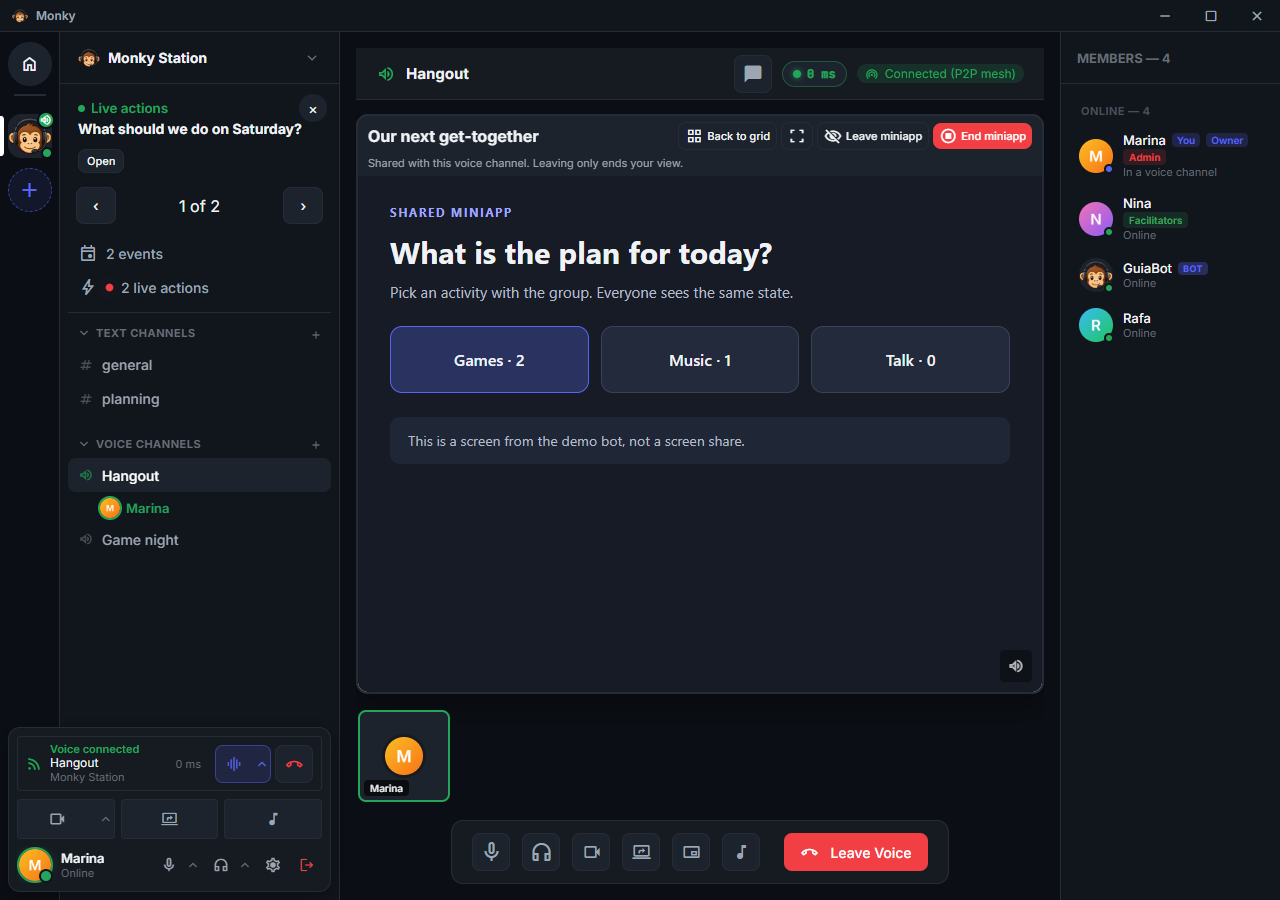
A screen is an HTML/CSS/JavaScript miniapp displayed on the voice stage. People in the room receive an invitation in the same corner as screen-sharing notices and choose whether to view it. There is no miniapp chat card or automatic opening. Unlike private ctx.prompt() forms, it accepts multiple participants and remains active after its command handler finishes. MonkyBot's /jogo-da-velha demonstrates two players and spectators; its rules remain in the bot, not in a viewer's JavaScript.
The tile stays on the stage alongside cameras and screen shares, even when its view is closed. Open miniapp starts local viewing and focuses the miniapp on the stage, just like opening its invitation, for any participant. Leave miniapp ends it and returns the tile to its closed state without closing the miniapp for anyone else. Before that, the miniapp may ask something, such as whether to save the game (see View lifecycle). Focusing or returning to the grid only changes the layout: it does not reload the screen or change player seats. Browsing Monky does not close the view either: while the person stays in the call, the miniapp stays open in the background (see In the background). Opening a screen to watch is not the same as joining its game.
End miniapp is a separate action: it removes the instance, tile, and invitations for everyone and closes all open views. It is available only to the person who invoked the creating command or an administrator (ADMINISTRATOR, including the server owner). The server enforces the same authorization and this connection's presence in the room; hiding a button is not the protection. The creator is the authenticated creatorUserId, preserved when rejoining or using another device, not the bot's identity or a caller-supplied field. Screens created without an invocation have no human creator; only administrators can end them from the client.
Other open views display a temporary notice with the miniapp's name, in the client's language. People who only received an invitation or already left the view do not receive this notice.
Inside a command, ctx.createScreen() queries the caller's current voice room and binds the miniapp to that room and invocation, including authorized private rooms. screen.channelId always identifies a voice channel, not ctx.channelId (the command's text channel). Creation without voice membership is rejected. The bot does not need an audio connection to host a miniapp. Standalone bot.createScreen(serverId, input) requires the bot's own access; supplying invocationId enables invocation-scoped authorization. This does not grant general access to private messages.
bot.command({
  name: 'screen',
  description: 'Open a shared screen',
  voiceRequirement: 'joined',
  handler: async (ctx) => {
    await ctx.createScreen({
      title: ctx.locale === 'en' ? 'Shared screen' : 'Tela compartilhada',
      html: `<main id="message"></main><script>
        window.monkyScreen.onState(state => {
          document.getElementById('message').textContent = state.message;
        });
      </script>`,
      state: { message: ctx.locale === 'en' ? 'Hello, everyone!' : 'Olá, pessoal!' },
    });
  },
});
Inside the isolated document, the window.monkyScreen bridge provides:
| Screen API | Behavior |
|---|---|
viewer | Frozen local context with id, nickname, and locale (pt-BR or en) for the person opening the screen |
onState((state, revision) => ...) | Delivers initial state and updates; returns an unsubscribe function |
sendAction(action, payload) | Sends an intent bound to the current revision; returns whether the bridge accepted sending it, not whether the bot accepted the action |
onBeforeClose(handler) | Runs before a close this person asked for; returning false keeps the view open. See View lifecycle |
onClose(handler) | Runs on every close, with the view already hidden and muted, for up to 5 seconds |
onVisibilityChange(handler) | Tells at once, and again on every change, whether the person can see the view. See In the background |
storage | Data kept on this computer, when the bot has device_storage and the person allows it; see Bot storage. Missing in older clients |
Read window.monkyScreen.viewer.locale inside the onState() callback to translate each person's controls. Changing the app language also triggers this callback without changing shared state/revision or recreating the iframe. Do not derive the controls' language from public state or the screen creator's language.
The SDK's screenAction event delivers { serverId, screenId, instanceId, channelId, userId, userNickname, action, payload, revision, actionId }. Use the authenticated identity in this envelope, never a player/user supplied in payload. Validate the action and game rules in the bot before calling await bot.updateScreen(serverId, screen, { state, expectedRevision }). Pass the returned snapshot, or a BotScreenRef containing { id, instanceId }, not just a string ID. An accepted update increments revision and reaches participants; an old revision is rejected rather than overwriting a concurrent change. HTML remains unchanged during state updates.
Use listScreens(serverId, channelId) with the voice room's ID to obtain current snapshots and closeScreen(serverId, screen) for bot-initiated termination. The server generates instanceId: even if id is reused, the replacement gets a different instance. Old updates, actions, terminations, and events cannot affect it. Human END is independent of the latest state revision; a concurrent update cannot prevent ending the correct instance.
The screenRemoved event delivers { serverId, id, instanceId, channelId, reason }. For reason === 'ended', it also includes the server-authenticated endedByUserId. Other reasons are closed, access_revoked, bot_disconnected, and view_revoked (revocation of one local view, not global termination). Delete the corresponding bot state after comparing server, ID, and instance: cancel timers/expiry, abort pending work, and release game seats. If the instance owns music playback, stop its source/queue and release its resources too; the SDK cannot infer a bot's domain rules. Never treat an instance-not-found error as an instruction to recreate it.
After END, the still-running creating invocation is cancelled, including its prompts and pending work; it cannot create another screen. A fresh command is required. Completed/expired invocations remain invalid for creation. The SDK rejects reads/updates whose responses were overtaken by a removal rather than returning an apparently live snapshot. After every await, check that the game session is still the same before storing results. ctx.signal is aborted if the invocation is still active, but does not follow the screen after its handler finishes: use screenRemoved for miniapp teardown.
Register listeners once and remove them on shutdown. The client restores active miniapps when joining their room; leaving, moving or disconnecting closes local viewing and revokes actions. Leave miniapp does not send END, erase shared state, or automatically release a player seat.
Shared state, no secrets: authorized participants currently in that voice room receive the HTML and JSON state. The server also checks room membership when listing screens or acting; another channel or another device in voice does not authorize this connection. Actions require USE_BOT_COMMANDS. Never include tokens, local paths, or a player's secret information. Screens receive no Node.js, preload, IPC, or access to the client's DOM.
View lifecycle
The onBeforeClose and onClose hooks tell the miniapp that this person's view is about to close. Monky only reports the event; the miniapp decides what to do, such as asking whether the person wants to save the game.
| Hook | When it runs | How Monky waits |
|---|---|---|
onBeforeClose(({ reason }) => ...) | Before Leave miniapp (leave) or End miniapp (end), when this person asks for it | The view stays open and may ask anything. Handlers run in order; the first one returning false, directly or through a promise, keeps the miniapp open |
onClose(({ reason }) => ...) | On every close, including after an onBeforeClose | Up to 5 seconds, with the view already hidden and muted, without new state or sendAction; storage keeps working. Handlers run in parallel |
Both return a function that removes the registration. Register them while the document loads: Monky only waits for hooks it already knows about. The onClose reason tells why the view closed:
reason | Situation |
|---|---|
leave | The person clicked Leave miniapp or Close now |
end | The person ended the miniapp for everyone |
ended | The miniapp no longer exists: someone else ended it, or the bot closed it, disconnected or lost access to the room |
revoked | This view lost access: the person left the room or joined another one, even on another server, disconnected or lost permission. Browsing Monky does not close the view |
While onBeforeClose answers, the tile's button becomes Close now (or End now), and a filmstrip tile comes into focus so the question is readable and clickable. The person can always leave: the bridge acknowledges the request by itself, and if the document does not acknowledge it within 3 seconds because it is stuck, Monky closes the view. After the acknowledgement, there is no time limit while the person answers. An exception in a handler is logged in the miniapp's console and does not prevent the close.
On every close, the screen disappears, the audio is silenced and actions are cut off at once; revocations and ends by other people do so without waiting for onBeforeClose. Only then does onClose run, invisibly, for at most 5 seconds; if it does not finish, the document is discarded. As with the volume adjustment, the silence does not reach child iframes such as embedded players: stop them at the start of onClose. In that window the document keeps its own network access, and the bot's service remains responsible for authorizing what it receives. Quitting or reloading Monky leaves no time for any hook: there is only the browser's synchronous pagehide event. An app crash gives no notice at all.
const screen = window.monkyScreen;
let unsavedProgress = false;

// Clients released before the hooks lack these methods.
screen.onBeforeClose?.(async () => {
  if (!unsavedProgress) return;
  const choice = await askInsideTheMiniapp(); // 'save' | 'discard' | 'stay'
  if (choice === 'stay') return false;
  if (choice === 'save') await save();
  unsavedProgress = false;
});

screen.onClose?.(async () => {
  // No screen and no sound: save without asking.
  if (unsavedProgress) await save();
});
Since onClose runs without a screen, do not ask the person anything or start downloads in it: save to the bot's service or, if the person allowed it, to storage on the computer, and also keep a periodic save for the cases without a hook. A download the person starts from a miniapp button before onBeforeClose answers, on the other hand, reaches the browser before the view closes and carries on afterwards.
In the background
Browsing Monky does not close the view. If the person stays in the call and opens a text channel, Home, another server or another room's stage, the miniapp stays open in the background: hidden, but with the same document, receiving state and sending actions. A notice in the sidebar takes them back to the stage without reloading or asking for permission again. Leaving the room, joining another one, disconnecting or losing permission still close the view as revoked.
onVisibilityChange((visible) => ...) tells whether the person can see the view. The handler runs as soon as it is registered, with the current value, and then on every change. visible is false while the miniapp is in the background, while its tile is outside the visible part of the stage (scrolled out of the filmstrip, for example) and while the Monky window is minimized or in the tray, and it turns back to true when the view shows again. Prefer this hook to the visibilitychange event: with Monky minimized, the page stays visible. Once the view starts closing, the handler no longer runs, since onClose already says the view is gone.
While hidden, the document is not drawn: requestAnimationFrame stops and timers drop to about once per second, so a game driven by them freezes mid-play. Its audio carries on at the chosen volume, like a screen share watched off stage: <audio>, <video> and Web Audio keep playing. Pause the game, and its sound, while the person cannot see it.
const screen = window.monkyScreen;

// Clients released before the hooks lack this method.
screen.onVisibilityChange?.((visible) => {
  if (visible) game.resume();
  else game.pause(); // sound included
});
Miniapp web capabilities
The server administrator authorizes the bot's miniapps capability during permission review. Participants opening a view only receive an information notice with Continue and open or Cancel; they do not select capabilities or grant new bot permissions. The notice describes networking (including the local network), web storage, audio/video, manually selected files, downloads, fullscreen, pointer capture and bridge-provided data. Selecting a file allows the app to read it and potentially send it over the network.
If the administrator approved device_storage, the same notice asks whether the miniapp may keep data on the computer of whoever opens it: Do not store (default), This session only or Always. The choice applies only to that computer and does not change the bot's permissions on the server. See Bot storage.
Cancelling creates no document and executes none of its code. Leaving, losing access, changing rooms/servers or disconnecting closes the view and revokes bridge actions; opening again shows the notice. Confirming an opening cannot bypass permissions denied by the administrator or confirm for other participants. Local tool execution retains its own confirmations on the executing computer.
The operator hosting a bot with the SDK runtime CLI separately consents to execution on their machine/VPS. This consent grants no capabilities on Monky servers and does not create an operating-system sandbox.
External pages inside the miniapp can register Service Workers that keep running after the view closes. Clearing the monky-miniapp://… origin does not clear other origins' storage or workers. Closing the view therefore does not completely revoke web resources. The notice discloses this behavior without promising isolation of all external resources.
The notice adds no artificial network restrictions: connect-src does not cover WebRTC. Cancelling does not execute the miniapp. Camera, microphone and other unsupported capabilities remain blocked even after confirmation.
Each document has a random monky-miniapp://… origin, separate from Monky and other views. It is not a srcdoc sharing the host application's origin. Apps can use external scripts/styles, fetch, WebSocket, WebRTC, WebAssembly, Workers, canvas/WebGL, audio/video, forms, web storage, file selection, and downloads. Fullscreen and pointer lock follow browser interaction rules. Camera, microphone, display capture, clipboard, and devices are not automatically authorized; miniapps do not inherit the client's permissions.
External resources follow CORS and browser rules. Configure the service to accept the miniapp's origin and use HTTPS/WSS in production. A new view gets a new origin: do not use its web storage to persist a game; monkyScreen.storage exists for that. Large resources and real-time traffic can go directly to the app's service, without going through state or sendAction. The Monky envelope limit therefore does not cap the size of an engine, media, or files loaded by the application.
Navigating the miniapp frame keeps the destination isolated but does not transfer the authenticated monkyScreen bridge. Use in-document navigation or a child iframe when the app needs to retain the bridge. Popups and navigation of Monky's main window remain blocked. Origin storage is cleared when the view closes.
Each participant adjusts the miniapp's volume on their own card, from 0 to 200%, and can mute it, with the same control as a screen share. Its button sits over the miniapp's bottom-right corner: keep essential controls out of that corner. The bottom-left corner gets the storage warning when the bot's space is almost full. Monky applies the adjustment inside the isolated document, before the bot's scripts, to <audio>/<video> and to the destination of every AudioContext. The app still reads back the volume it set on its elements. Above 100%, only Web Audio is amplified: the browser caps <audio>/<video> at 100%. OfflineAudioContext is left unchanged. Child iframes, such as embedded players, and pages the frame navigates to do not receive the adjustment; play audio in the miniapp document itself.
Authenticate external connections through an action received by the bot; never trust a browser-supplied userId or publish tokens in shared state. Close connections, Workers, audio, and timers when leaving the view, in onClose (or pagehide, on clients released before the hooks). If an app relies on an external service, check its availability and show an explicit error before starting the activity.
When the bot itself serves the miniapp's resources from its own port, declare it in monkyBot.requirements (usually exposure: "public" and when: "on-demand") and call handleReachabilityProbe(request, response) at the start of that HTTP handler. The operator then sees which port to open, and doctor can prove it is reachable.
Control-envelope limits are 128 KiB of initial HTML, 64 KiB of state, and 8 KiB per action; JSON allows up to 12 levels and 8,192 nodes. There may be up to four miniapps per voice room, 16 per bot, and 64 per server, with rate limits and action deduplication. They live in memory and are removed on bot restart/disconnection, loss of room authorization, or authorized termination. Leaving the room, even emptying it, does not automatically delete state. Game expiry belongs to the bot. If you persist games, persist their terminal status too: a bot restart must not restore an explicitly ended game.